Leads & quote page
Marketing & leads is where enquiries turn into booked jobs. Every call, text, DM, and website form lands in one pipeline; you reply with a preset in a tap, follow up on a schedule, and convert a warm lead into a client, property, and job without retyping a thing.
Where to find it #
Sidebar → Marketing
The page stacks a few panels top to bottom: your business profile, your hosted quote page, a Log a lead quick-add, the lead pipeline, preset responses, and campaigns. It's a Pro feature — on the free tier the panels show but stay locked.
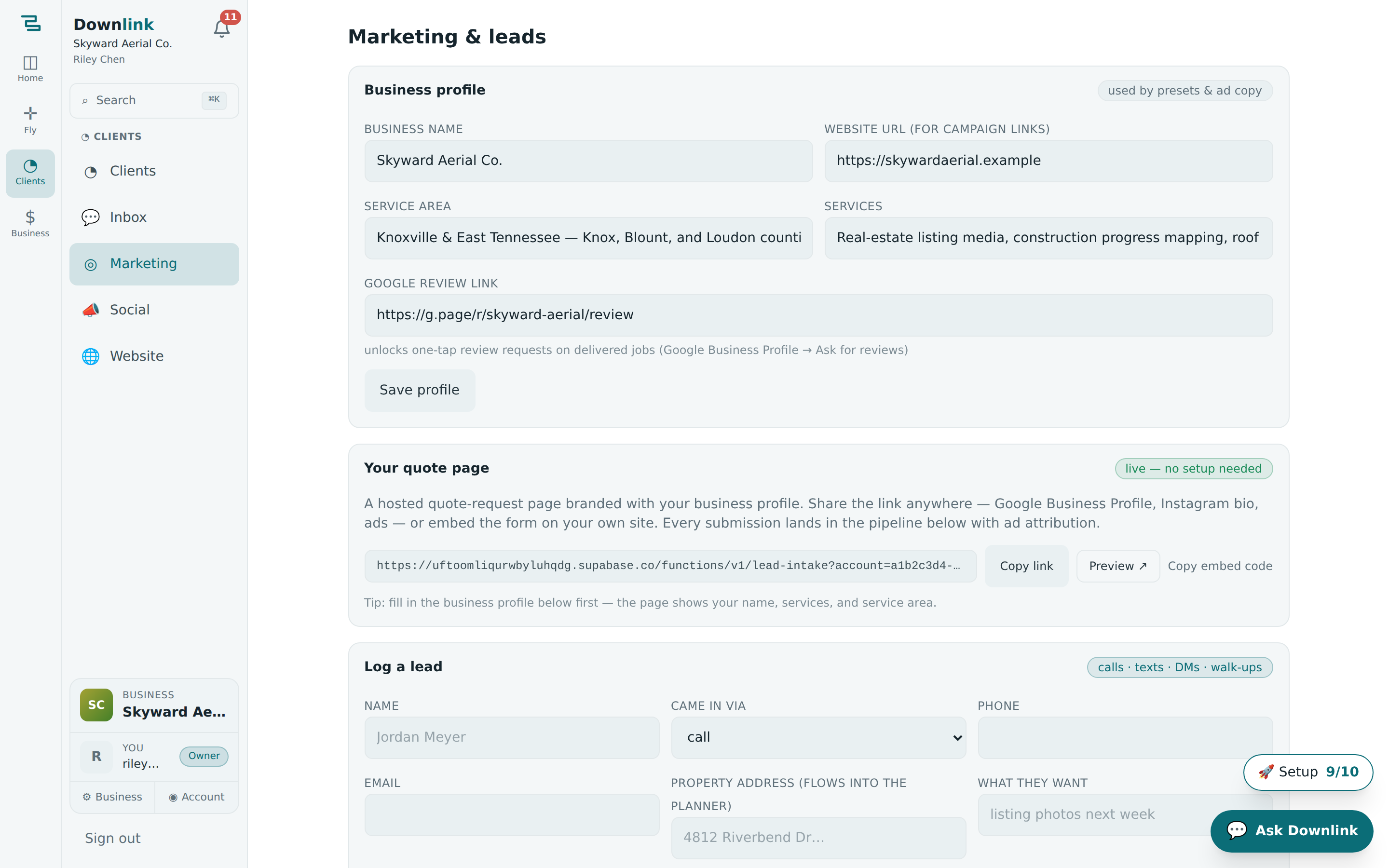
Your hosted quote page #
Every account gets a branded quote-request page hosted for you — no website required. It shows your business name, services, and service area straight from the Business profile panel, so fill that in first.
- Brand it — in Business profile, set your business name, services, service area, website URL, and Google review link, then Save profile.
- Share the link — in Your quote page, hit Copy link and drop it into your Google Business Profile, Instagram bio, or an ad. Use Preview ↗ to see exactly what a client sees.
- Or embed the form — Copy embed code gives you an
<iframe>to paste into your own site's HTML. - Watch it fill — every submission drops into the pipeline below, tagged with its ad attribution (see the note).
This is your public lead-capture page — anyone can request a quote. The page a client uses to accept and pay a specific quote you've sent lives with quotes & invoices. Different jobs, both login-free.
Log a lead #
Website-form leads arrive on their own. For calls, texts, DMs, and walk-ups, use Log a lead so nothing slips. Only Name is required; add an address and the Convert button will carry it into the planner.
Riley Chen takes a call from a builder who found Skyward through a Google ad, and logs it before hanging up.
| Field | Example value | Why/Notes |
|---|---|---|
| Name | Sam Ruiz | The person you spoke to. The only required field. |
| Came in via | google_ads | One of website, google_ads, facebook, instagram, gbp, text, call, referral, other. Shows as a badge on the lead. |
| Phone | (865) 555-0173 | Powers the one-tap Text preset. |
| sam.ruiz@northgateconstruction.example | Powers the Email preset and the mailto reply. | |
| Property address | 88 Foundry Rd, Knoxville, TN 37917 | Flows into the planner on conversion — the map opens pre-loaded. |
| What they want | monthly progress mapping for the new build | Carried onto the job as notes when you convert. |
The lead pipeline #
Each lead moves through five stages — new → contacted → qualified → converted → lost — set from the status dropdown or filtered with the chips at the top (each shows a live count). On every lead you can:
- Reply with a preset — pick a template and send it as an ✉ Email preset, a 💬 Text preset, or copy for DM. Sending advances the follow-up step for you.
- Follow up on a cadence — the flow runs First response (day 0), Gentle follow-up (day 2), and Last touch (day 7). A red follow-up overdue badge flags anyone waiting on you.
- Draft with AI — ✨ AI draft writes a tailored first reply from the lead's message; you review it before anything sends.
- Convert — Convert → client + plan creates the client, property, and job in one click and opens the planner at the address.
Preset responses #
Presets are your canned replies. Built-in ones cover the common enquiries; add your own under Preset responses with a name, optional subject, and body. Drop in {name}, {business}, and {area} and they auto-fill from the lead and your profile when you send.
Campaigns & Google Ads #
A campaign gives you a tracked link so you can see which channel is actually producing work.
- Create it — name the campaign (e.g. Spring listings push), pick a channel (google_ads, facebook, instagram, gbp, nextdoor, referral, organic, other), and Create.
- Copy the tracked link — it points at your website when set, otherwise your quote page, with UTM tags baked in. Paste it as the ad's final URL.
- Read the attribution — leads that arrive through the link carry the campaign tag, and each campaign shows a live N leads count.
- Grab the ad copy — expand ready-to-paste Google Ads copy for headlines (≤30 chars) and descriptions (≤90 chars) built from your profile.
Your name, services, and service area feed the quote page, the {business}/{area} presets, the tracked links, and the generated ad copy. Two minutes here makes every panel below work properly.
A quote-page submission keeps its UTM tags (and Google's gclid) from the tracked link, so it lands already labelled with the campaign that earned it. When you convert, that history carries onto the client — you can see later that Cedar Ridge HOA came from your Spring listings push, not just that they turned up.