Airspace & weather
Before you commit a day to a shoot, two questions decide everything: can I fly here, and when is it worth flying? Downlink answers both on the job — a live FAA airspace verdict for the site, the next 7 days of daylight hours scored and ranked into flight windows, one-tap scheduling, and a printable flight brief for the tailgate.
Where to find it #
Sidebar → Jobs → open a job
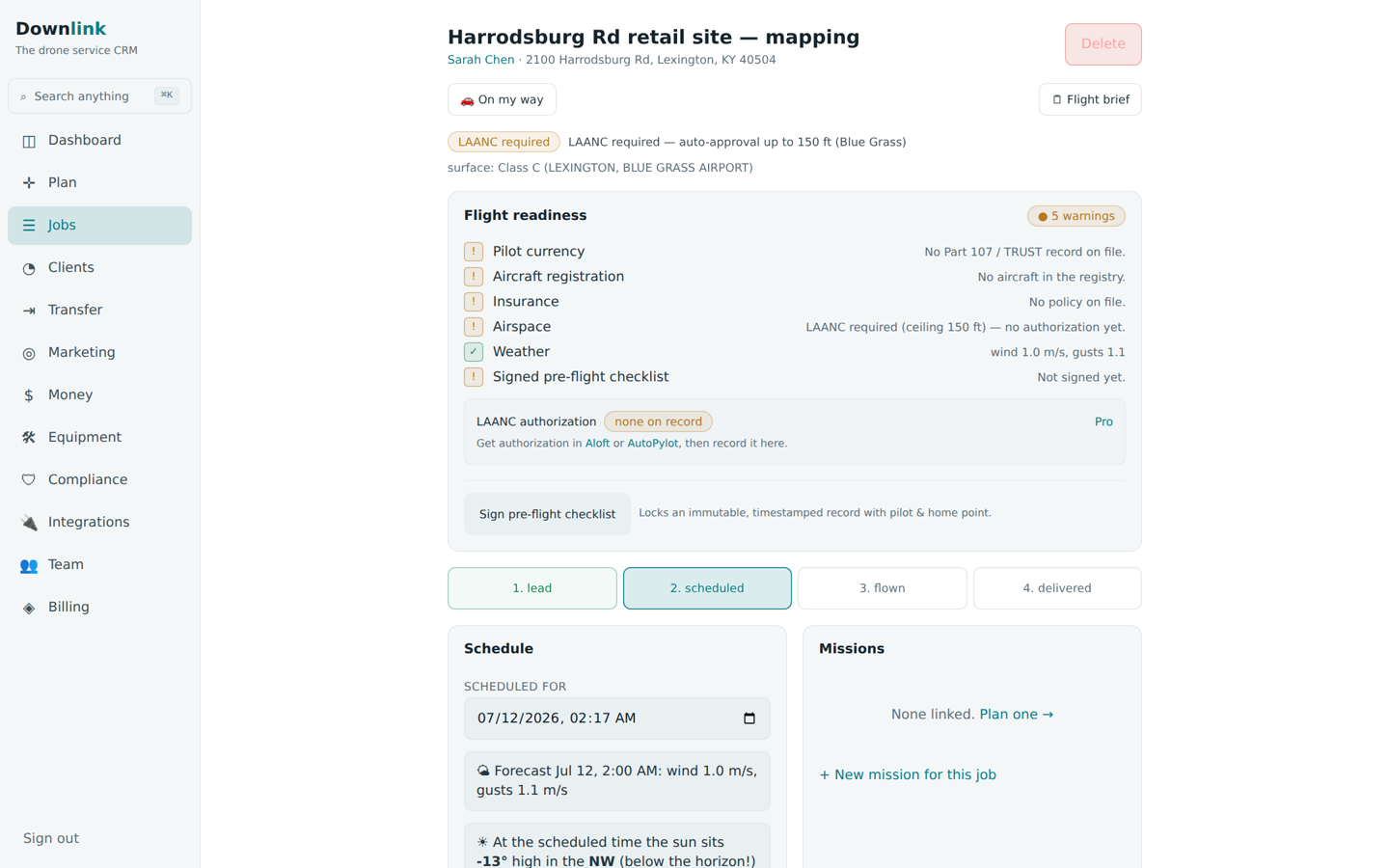
As soon as a job's property has coordinates, the airspace verdict appears at the top and the Flight windows card sits just below the schedule. The 🗒 Flight brief button (top right of the job) opens the print-ready page. Set the property when you add a client or plan in the mission planner and all of this lights up automatically.
The airspace verdict #
Downlink checks the FAA's UAS Facility Maps (the LAANC grid) and Class Airspace boundaries for the exact point and returns one of three verdicts:
- Airspace clear — Class G — fly up to 400 ft, no authorization needed. You're in uncontrolled airspace.
- LAANC required — auto-approval up to the grid ceiling (e.g. 300 ft) under the named controlling airport. File the LAANC request, stay at or below the ceiling.
- No auto-auth — a 0 ft grid cell near an airport. No automated authorization at any altitude; you'll need manual FAA authorization first.
Where controlled airspace touches the ground, the line also shows the surface class — Class C (MCGHEE TYSON), for instance. The verdict is cached on the property for 30 days, so revisiting a job doesn't re-query the FAA.
Flight windows, ranked #
The Flight windows card scores every daylight hour for the next 7 days on wind, gusts, rain chance, and cloud, then groups consecutive flyable hours into windows and lists the best first.
- Read the top windows — each shows its span, average wind, peak gusts, and worst rain chance. A ☀ golden hour badge marks windows with warm, low-sun light — those rank higher on purpose.
- Tap Schedule — one tap drops that window's start into the job's Scheduled for slot and, if the job was still a lead, moves it to Scheduled.
- Check the slot — the Schedule card then shows the wind forecast and where the sun sits (elevation, compass direction, and the golden-hour band) for that exact time.
An hour is dropped if wind tops 10 m/s, gusts top 13 m/s, or rain chance hits 50% — or it's dark. Everything that survives is scored 1–100, so the windows you see are all genuinely flyable, just ranked by how pleasant.
The printable flight brief #
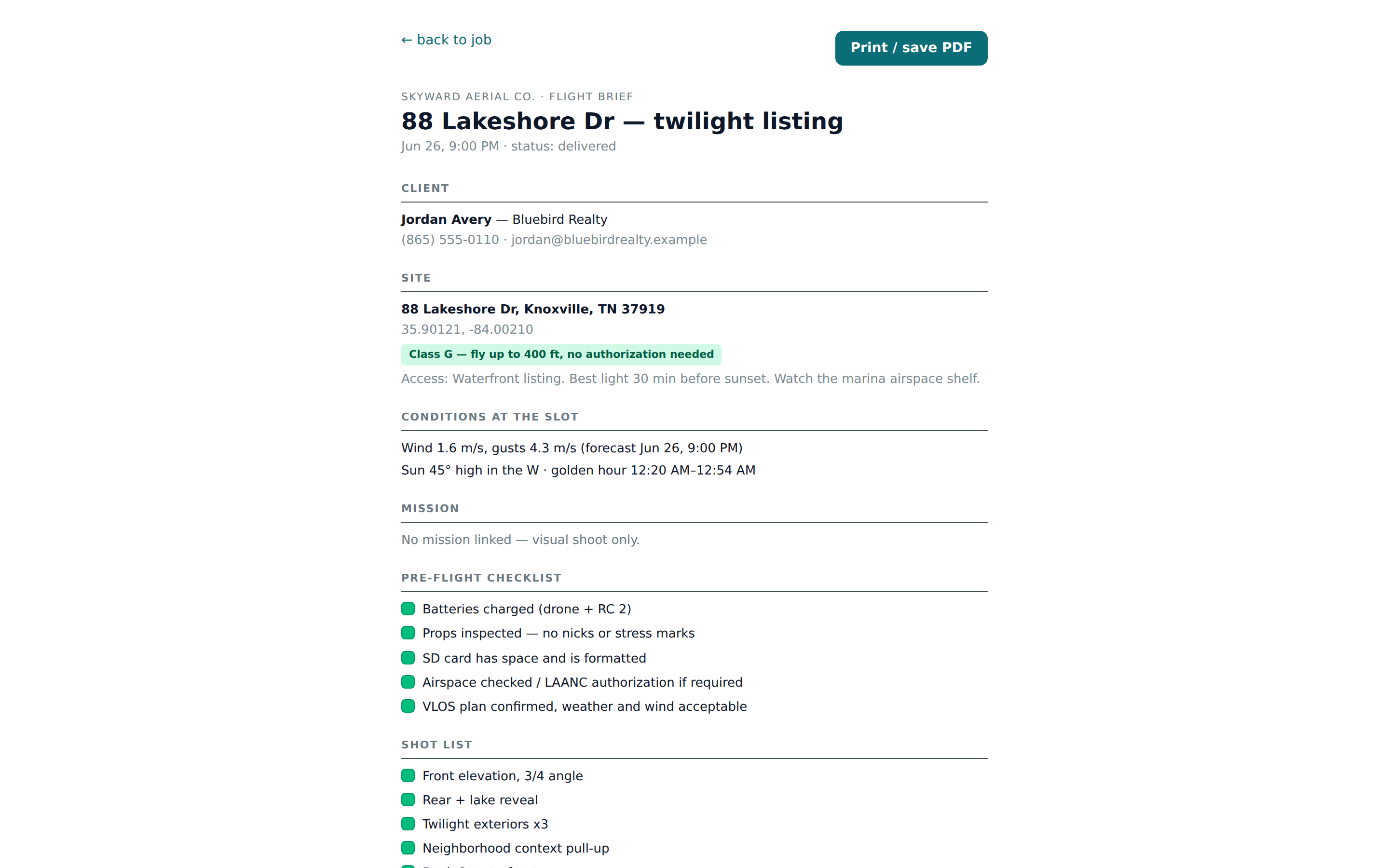
Hit 🗒 Flight brief to build a one-page rundown of everything you need on site: client contact, the address with coordinates, the airspace verdict, conditions at the slot, the mission's numbers (waypoints, parts, est. time, batteries, photo interval), your pre-flight checklist, shot list, and access notes. Print / save PDF sends it to paper or your phone.
Riley Chen of Skyward Aerial Co. is booking a dusk shoot for a Bluebird Realty listing that sits under McGhee Tyson's Class C shelf. Here's the airspace-and-weather readout on the job.
| Field | Example value | Why / Notes |
|---|---|---|
| Site | 88 Cedar Ridge Way, Knoxville, TN 37920 | The job's property — drives every check below. |
| Airspace verdict | LAANC required — auto-approval up to 300 ft (MCGHEE TYSON) | File the LAANC request before takeoff; keep the mission at or below 300 ft. |
| Surface class | Class C (MCGHEE TYSON) | Controlled airspace touching the ground here — pulled from the FAA boundary. |
| Best flight window | Thu 17 Jul, 6 PM–8 PM · ☀ golden hour | Highest-scored run of daylight hours in the next 7 days. |
| Window conditions | wind 3.2 m/s · gusts to 5 m/s · rain ≤10% | Comfortably under the 10 m/s wind and 13 m/s gust limits. |
| Scheduled for | Thu 17 Jul, 6:30 PM | Set in one tap with Schedule; the job moved from lead to scheduled. |
| Sun at the slot | 11° high in the WNW · golden hour 6:12–7:24 PM | Warm, raking light — exactly what sells a listing. |
| Flight brief | Printed / saved as PDF | One page for the tailgate: contact, site, airspace, conditions, mission, checklist. |
Rather than guessing a date and hoping, open a job and let the flight windows tell you the best golden-hour slot in the week — then tap Schedule and print the brief. Booking runs backwards from the weather and the light.
The verdict, forecast, and windows are decision support — best-effort data from public FAA and weather services. Always confirm airspace, NOTAMs, and current conditions yourself before takeoff. The brief prints the same reminder at the foot of the page.