Jobs & pipeline
Jobs are the pieces of work you actually fly — a listing shoot, a roof inspection, a mapping survey. The Jobs page is a drag-and-drop pipeline that moves each one from first enquiry to delivered, and every job opens onto a single detail page that pulls together the client, airspace, weather, mission, money, and delivery in one scroll.
Where to find it #
Sidebar → Jobs — in the grouped menu it sits under Fly. You can also start a job straight from a client's page, which carries the client and their property in for you.
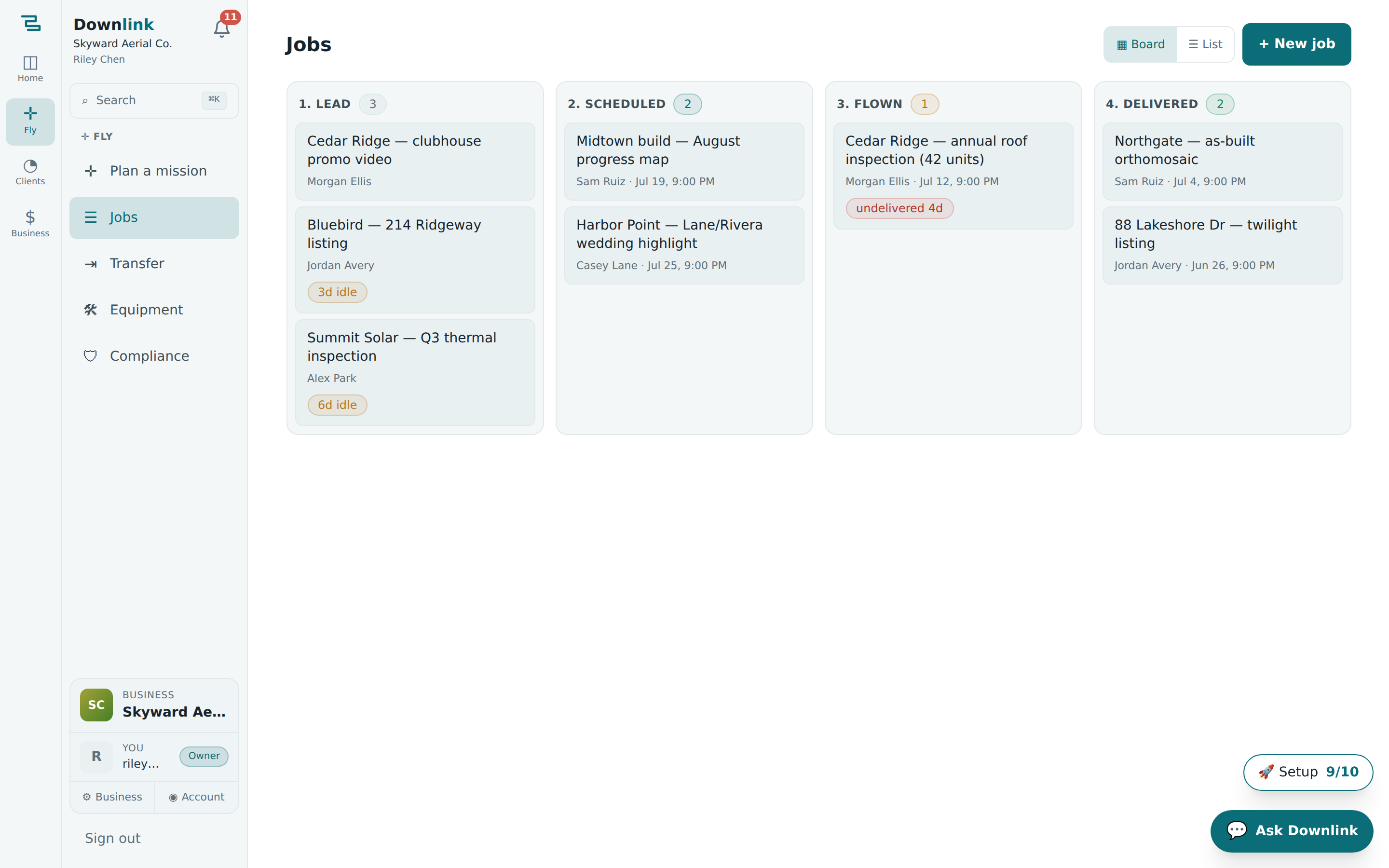
The pipeline board #
The board has four columns, in the order a job travels through them:
- Lead — an enquiry you haven't committed to yet.
- Scheduled — booked in with a flight date on the calendar.
- Flown — you've been on site and captured the data.
- Delivered — the client has their files and the job is done.
Drag a card from one column to the next to advance it — the move saves instantly. Each card shows the job title, the client (a link to their record), and the flight date once one is set. Prefer a plain list? Flip the ▦ Board / ☰ List toggle top-right; the list view adds per-stage filter chips.
Create a job #
- Open the form — click + New job (top right).
- Pick a template — choose Real estate listing, Roof inspection, Construction progress, or Mapping survey to pre-fill the shot list and working notes, or leave it on — blank job —.
- Name it and attach a client — give it a Title and pick the Client from the list (both optional, but a title makes the board readable).
- Create job — it lands in the Lead column, ready to drag onward.
Riley Chen at Skyward Aerial Co. books a listing shoot for a Bluebird Realty property:
| Field | Example value | Why/Notes |
|---|---|---|
| Template | Real estate listing | Pre-fills a six-shot list (hero aerial, top-down ortho, golden-hour front…) and MLS notes. |
| Title | Bluebird — 1200 Market St listing | Shows on the board card and the detail header. Placeholder if left blank. |
| Client | Bluebird Realty (Jordan Avery) | Links the job to their record and unlocks one-tap "On my way" and review texts. |
| Property | 1200 Market St, Knoxville, TN | Carried in from the client's saved property (or the planner). Drives airspace, weather & sun. |
| Scheduled for | Fri 24 Jul 2026, 18:30 | Set on the detail page's Schedule card; moves the card to Scheduled and fetches the wind forecast. |
| Mission | Bluebird — 1200 Market St survey | Linked from the planner; auto-fills the pre-flight checklist. |
| Shot list | 6 shots (from template) | Tick items off on site; add or remove any with the Add box. |
| Notes | Gate code 1847. Confirm MLS dimensions with Jordan. | Access notes, client asks, gate codes — saved on blur. |
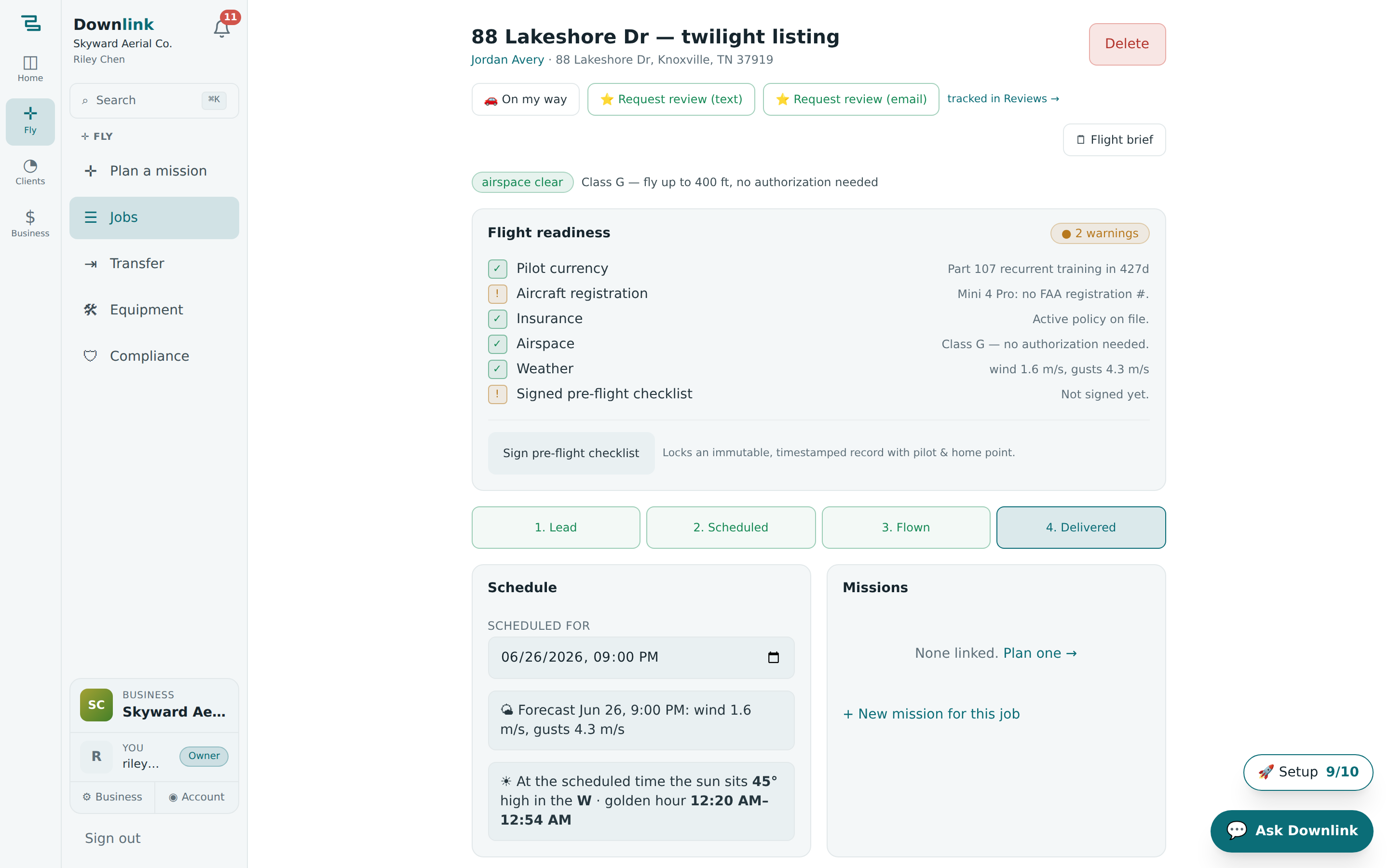
The job detail page #
Click any card to open the job. Everything for that flight lives here, top to bottom:
- Header & one-tap comms — the client, the property address, a 🚗 On my way text, a 🗒 Flight brief, and — once delivered — ⭐ Request review by text or email.
- Airspace & readiness — an airspace advisory line (Class G? LAANC ceiling?) and a readiness summary drawn from the property, mission, and wind.
- Status pipeline — the same four stages as buttons; tap to advance without going back to the board.
- Schedule — set the flight time and see the forecast wind (with a 10 m/s planning flag), sun elevation, and golden-hour window for that slot.
- Missions & flight windows — plan or link a mission, and see the ranked flyable windows for the next few days.
- Shot list & pre-flight checklist — tick shots on site; the checklist auto-fills from the linked mission.
- Deliverables, datasets, delivery & invoices — attach files, share a branded delivery page, and raise the quote/invoice, all in place.
- Flight log & notes — log batteries and conditions after each flight.
Downlink flags jobs that are drifting so nothing slips. A Lead shows 3d idle after three days and 7d cold after a week; a Scheduled job whose flight date has passed reads flight date passed; and a Flown job undelivered after two days shows undelivered 2d — because flown-but-not-delivered is the reputation killer.
In the Missions card, hit Plan one → (or + New mission for this job) to open the mission planner with the property already loaded — the mission stays attached to the job and feeds its checklist.
The four job templates carry a tailored shot list and working notes — e.g. the roof template reminds you to fly after 10am to dodge dew glare, and construction tells you to re-fly the same saved grid each epoch for comparable maps.